Case Study | SharePoint Online · Microsoft 365 · SPFx · Enterprise Application Modernization
What happens when different departments need different ways to work with the same platform?
One team wants better filtering. Another needs faster access to documents. A third expects a familiar table with specific columns, saved views, and convenient navigation.
The natural response is to build a custom interface for each requirement.
That was the starting point of a recent SharePoint modernization project undertaken by Chiron IT.
The customer was working with several SharePoint lists and document libraries. The standard web parts did not offer the experience they wanted, so the request was to develop separate custom web parts for different collections.
It was a perfectly reasonable approach.
But after examining the requirements, our team noticed an opportunity.
The collections were different. Much of the functionality they needed was the same.
Instead of developing several independent components, we proposed one configurable content viewer capable of serving multiple business scenarios.
This decision became the foundation of the solution—and an interesting example of how looking beyond an initial technical request can create more long-term business value.
1. The challenge: different content, different expectations
The project was part of a broader effort to modernize an existing enterprise SharePoint application.
Over time, the original solution had accumulated dozens of custom web parts, environment-specific dependencies, and configuration embedded directly in the code.
Moving selected functionality into a separate SharePoint environment required more than a straightforward deployment.
Our team first worked to make the necessary components independent, reduce environment-specific dependencies, and simplify how the solution could be maintained and deployed.
But as the project progressed, another challenge emerged: the experience of working with SharePoint content.
The customer used different lists and document libraries to support everyday business activities. Each collection had its own purpose, structure, and expectations.
For example, a typical business workspace might include:
| Business content |
Expected experience |
| Work Register |
Review records, sort columns, and filter by status |
| Published Documents |
Find files and open document previews |
| Review Records |
Browse relevant entries and open record details |
| Reference Library |
Search and navigate supporting materials |
These are illustrative examples, but the underlying requirement was real.
The customer needed more control over how information appeared and how users interacted with it.
The initial proposal was to develop custom web parts for individual collections.
From a short-term delivery perspective, that could have been an effective solution. Each component could be tailored to its specific data structure and user expectations.
However, it would also introduce another collection of custom applications to maintain.
A new column could require a code change. An improvement to filtering might need to be implemented in several places. A new collection could result in another development and deployment cycle.
And as business needs evolved, those components could gradually drift apart.
This raised a more fundamental question:
Were we dealing with several different applications—or several configurations of the same application?
2. The architectural decision: make the differences configurable
We reviewed what the requested interfaces had in common.
Despite their different data structures, the core functionality was remarkably similar.
Users needed to browse records, apply filters, sort information, search within collections, and open the appropriate items or documents.
What varied was mostly the configuration: the source list or library, its columns, the selected SharePoint view, the display labels, and the behavior of individual links.
That led to our proposal:
build the shared functionality once, and make the differences configurable.
 One component, multiple business scenarios
We developed a reusable SharePoint content viewer using the SharePoint Framework (SPFx).
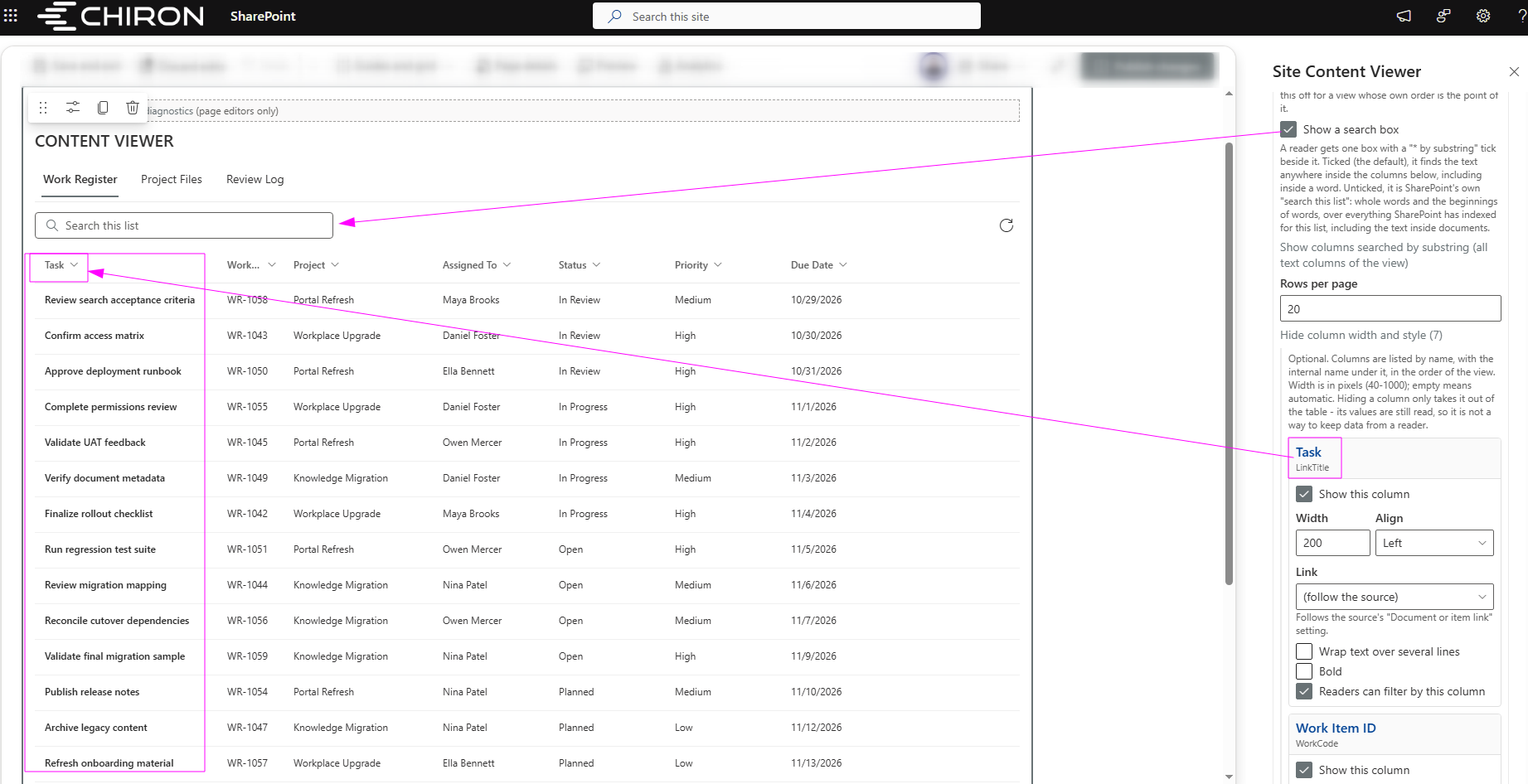
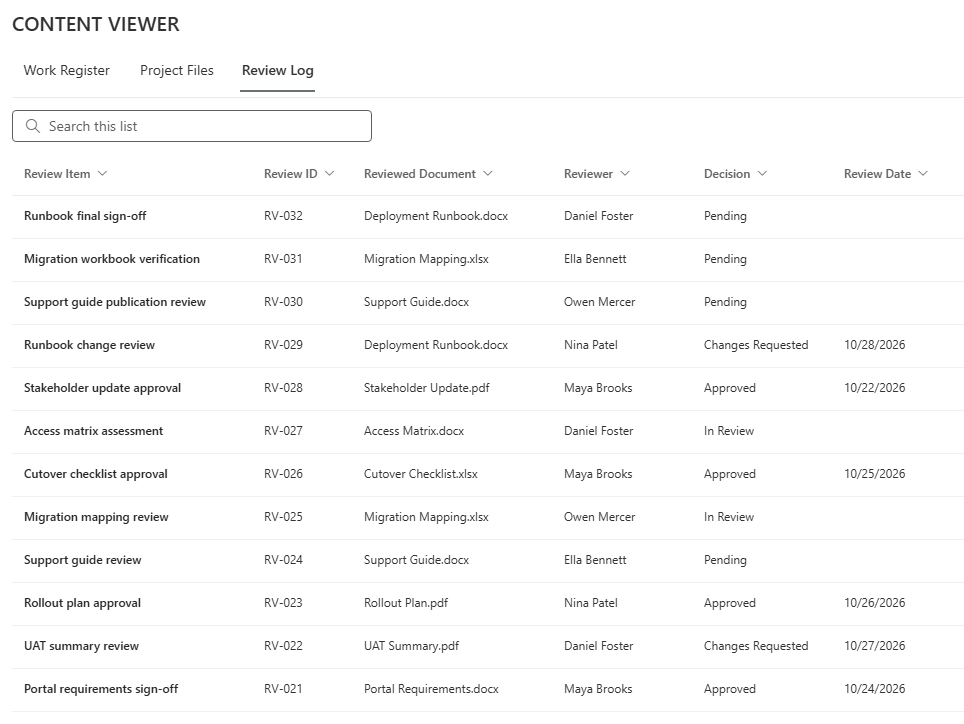
Instead of creating a separate web part for each list or document library, a page author could configure the component to display multiple collections within the current SharePoint site.
Each collection could have its own saved view, display settings, and navigation behavior.
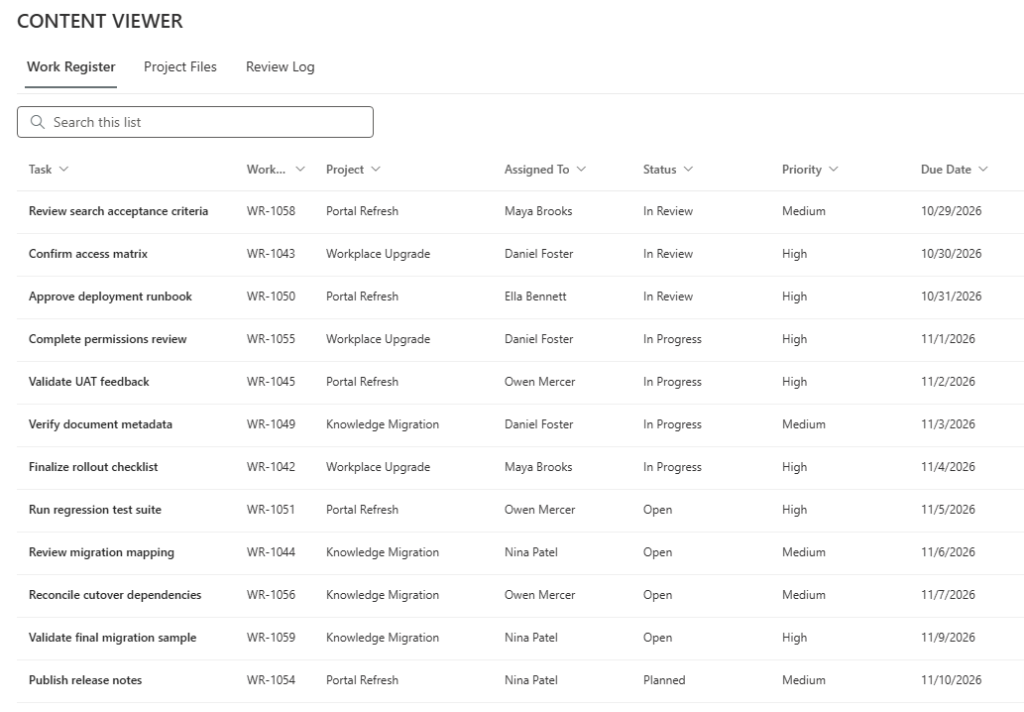
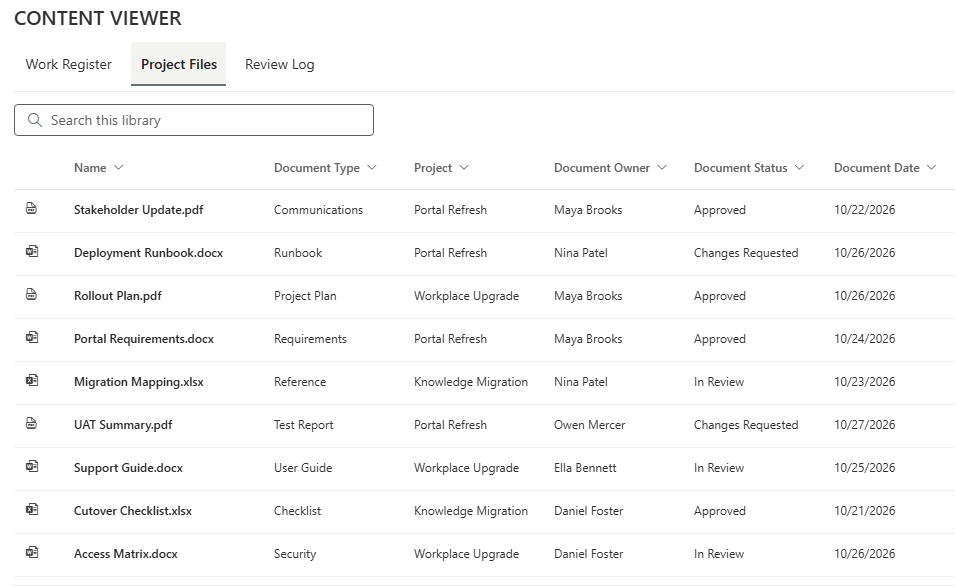
Readers could move between collections through tabs while using a consistent interface.
For example, the same viewer could present a work register on one tab and a document library on another, without requiring separate implementations of the underlying table and navigation functionality.
The component was deliberately designed without dependencies on specific business collection names or the original SharePoint environment.
This mattered because the solution would not need to be redesigned whenever another supported collection was introduced.
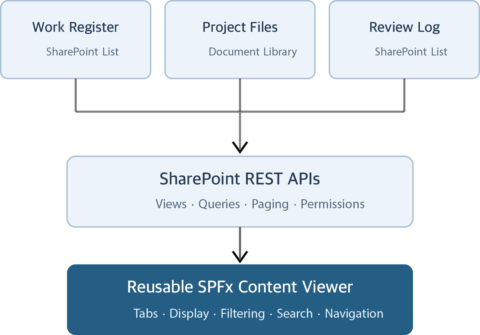 Keep SharePoint responsible for the data
An equally important decision was to reuse SharePoint's existing capabilities rather than rebuild them.
SharePoint already manages lists, libraries, saved views, and access permissions.
The custom viewer was designed to work with those capabilities, not replace them.
Saved SharePoint views provide the foundation for determining which records should appear and how they should be ordered. Data is retrieved in pages from SharePoint rather than loading entire collections into the browser.
The viewer also operates within the current user's SharePoint permissions and does not introduce a separate data store or write operations.
This creates a clear separation of responsibilities:
SharePoint manages the information.
The configurable web part improves how people work with it.
That distinction made the solution easier to reuse without unnecessarily duplicating platform functionality.
| ONE WEB PART
Three business collections
|
 |
 |
 |
|
Same component. Different configurations.
|
- From reusable architecture to a useful everyday experience
The architectural idea was straightforward.
Making the actual user experience work consistently across different collections was more challenging.
The viewer evolved through several rounds of customer feedback, and the requirements went well beyond displaying rows in a table.
 Familiar interactions still matter
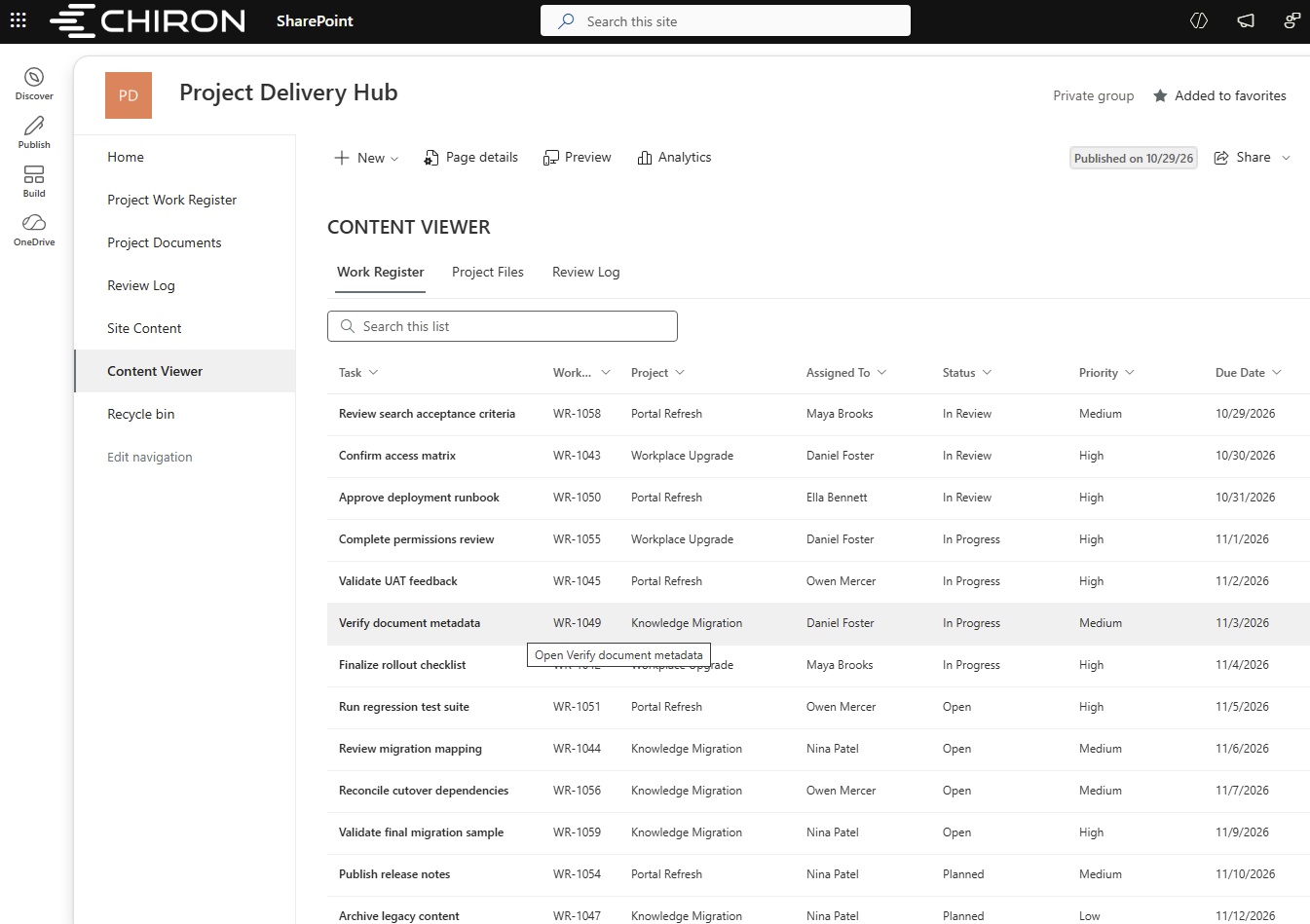
Users expected the interface to behave like the SharePoint lists and libraries they already understood.
Dates needed to display properly. Documents needed recognizable icons. Columns needed useful widths.
Clicking a regular list item should open its details, while clicking a document should open the file or its native preview.
Some collections also required different navigation behavior for specific columns.
These details may seem minor from a development perspective, but they have a significant influence on usability.
A component can be technically reusable and still be frustrating to use.
We therefore treated consistent, predictable behavior as part of the solution—not something to address after the architecture was complete.
The hidden complexity of filtering
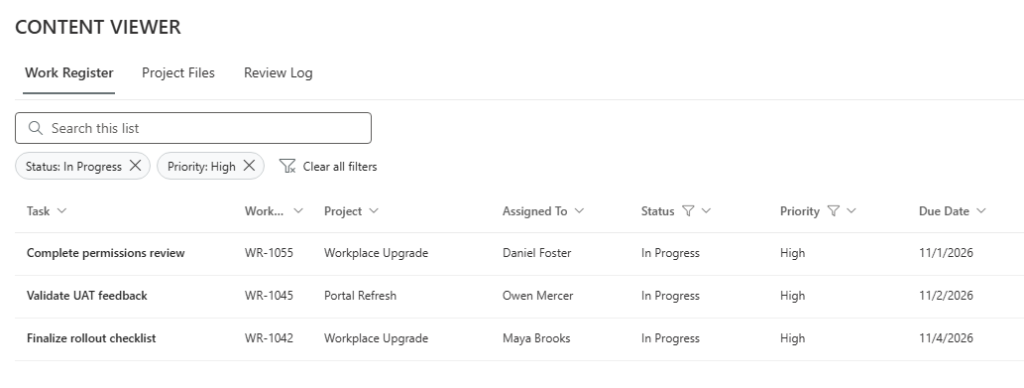
One of the most important requirements was that filtering should behave like a normal SharePoint list.
That sounds simple until the collection contains thousands of records.
Imagine an analyst working with a register containing 4,000 items.
The interface displays 30 records at a time.
The analyst selects a status filter and sees five matching records.
But what if the component filtered only the 30 records currently displayed instead of all the records covered by the selected view?
The results could look perfectly reasonable while leaving out relevant information.
For someone preparing a business report or reviewing operational activity, this is more than a technical defect. It can lead to incorrect conclusions.
To avoid that problem, we implemented server-side filtering against the configured SharePoint view rather than filtering only the records already loaded in the browser.
Multiple column filters also needed to work together, and the available filter values had to reflect the filters already applied.
Sorting and search introduced similar considerations.
 The goal wasn't simply to make the interface look familiar. It was to make sure its behavior could be trusted.
Search should mean what users expect it to mean
Search revealed another subtle challenge.
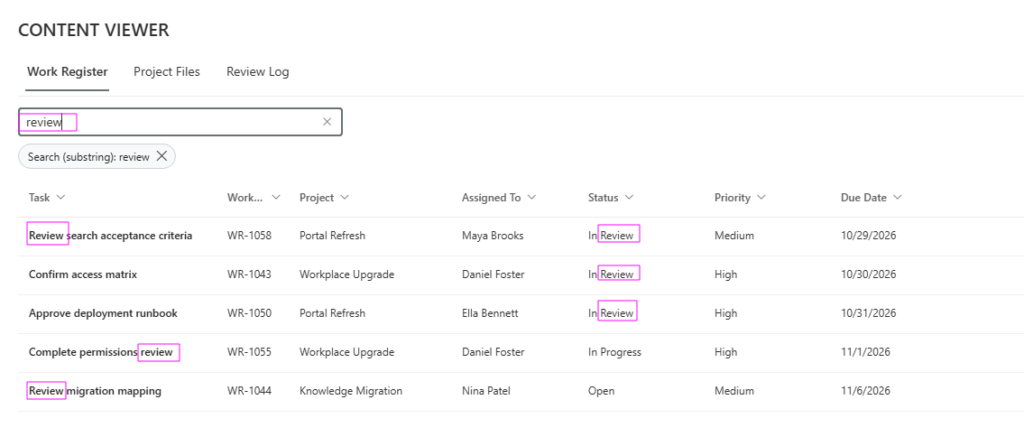
Users naturally expect to find documents and records by entering relevant text, sometimes only part of a file name.
However, different SharePoint query mechanisms can interpret search terms differently.
During implementation, we encountered cases where the underlying service did not process a search request as expected.
One particularly important finding was that a request could appear to succeed without actually applying the intended search behavior.
Instead of relying solely on successful server responses, we introduced additional checks and refined the search implementation.
We also developed a substring-search option for configured text fields.
The broader principle was simple:
when an interface promises filtering or search behavior, the application must verify that the data service is actually providing it.
For business users, reliability is not just about whether a page loads. It is also about whether the information displayed is complete and accurate for the action they requested.
- What the implementation taught us about reusability
The configurable approach made it possible to respond to repeated feedback by updating shared functionality rather than introducing another specialized web part.
Improvements to navigation, display behavior, filtering, and search could be incorporated into the same component.
But this architecture introduced an important responsibility.
When several business experiences depend on one component, a problem in that component can affect them all.
We encountered that risk directly.
During one deployment, a rendering defect caused the viewer to fail when no filters were selected—the default state when a user initially opened it.
The immediate correction was small.
The more valuable improvement was to extend our automated testing so that components were actually mounted and checked in their initial state, rather than testing only the underlying service logic.
Other findings reinforced the same lesson.
Some advanced SharePoint views could not be reproduced exactly in the custom interface. Rather than silently ignoring conditions that might change the records displayed, the solution needed to preserve the correct dataset, explain supported limitations, or reject configurations that could not be represented safely.
This was particularly important for filters, grouping, and other view behavior that users might rely on when reviewing business information.
The project also reinforced the importance of validating SharePoint integrations against a real environment, not relying exclusively on documentation or assumptions.
These challenges did not invalidate the reusable approach.
They demonstrated what it takes to make reuse dependable.
A shared component can reduce duplicated development, but it also deserves stronger regression testing, explicit limitations, and a disciplined approach to deployment.
- The outcome: a more adaptable foundation for future requirements
The most meaningful result was not simply that we developed fewer web parts than originally requested.
It was that we established a different approach to handling similar requirements in the future.
More flexibility for page authors
The implemented viewer allowed page authors to select supported SharePoint lists and libraries, choose saved views, and configure how collections appeared within a page.
For many presentation-related changes, this creates an alternative to requesting another custom component.
A new collection does not automatically mean a new development project.
Shared functionality instead of duplicated implementations
Rather than maintaining separate versions of similar browsing, filtering, and navigation behavior, the team could work with one shared implementation.
This provides a more consistent foundation for improvements and maintenance.
It also makes the relationship between configuration and application behavior clearer.
Less dependence on the original environment
As part of the broader modernization effort, the deployment package was separated from several legacy dependencies, and hundreds of environment-specific references were removed from delivered code.
The new content viewer itself was not tied to predefined collection names, fixed site paths, or a particular customer environment.
This made the architecture better suited for reuse across other supported SharePoint sites and business scenarios.
Practical engineering improvements
The documented implementation included multiple customer-feedback iterations, substantial automated test coverage, and additional safeguards introduced as real integration issues were discovered.
At the recorded project milestone, advanced search behavior, large-list scenarios, and some preview and view configurations still required further validation or refinement.
That distinction is important.
The project demonstrated a working reusable approach and concrete engineering progress. It did not yet establish measured financial savings, employee productivity gains, or a completed organization-wide rollout.
Those business outcomes would need to be assessed through adoption data and operational measurements.
The architectural benefit, however, was already clear:
Instead of repeatedly developing separate interfaces for similar requirements, the organization gained a shared component that could accommodate different collections through configuration.
The bigger lesson: solve the business need, not just the initial implementation request
There is nothing inherently wrong with building a dedicated SharePoint web part.
Some requirements genuinely need specialized applications: complex business workflows, editing interfaces, advanced calculations, or highly specific processes.
The challenge is knowing when that investment is justified.
In this project, the customer described a legitimate business need and proposed an understandable implementation approach.
Our responsibility as a technology partner was to evaluate that approach, identify common requirements, and consider whether a different architecture could provide more lasting value.
The result wasn't a rejection of the customer's idea.
It was a refinement of how to achieve the customer's goal.
And that is an important distinction in enterprise software consulting.
Good solutions don't always start by implementing exactly what was requested. Sometimes they start by asking whether the same business outcome can be achieved in a more flexible, maintainable way.
For organizations managing growing portfolios of internal applications, the question is worth asking:
Does the next requirement really need another custom application—or could it be supported by improving and configuring what already exists?
The answer won't always be the same.
But asking the question early can prevent years of unnecessary complexity.
Continue the conversation
This case study is part of Chiron IT's
Behind the Solution series, where we share real engineering challenges, architectural decisions, and lessons from enterprise technology projects.
We're discussing this case on
Chiron IT's LinkedIn Page.
How does your team decide when a new business requirement calls for custom development—and when a reusable, configurable solution is the better choice?
Join the discussion and share your perspective.
Technologies: SharePoint Online, SharePoint Framework (SPFx), React, TypeScript, Microsoft Fluent UI, SharePoint REST APIs.
Client information, business collection names, and implementation-specific identifiers have been anonymized.


